
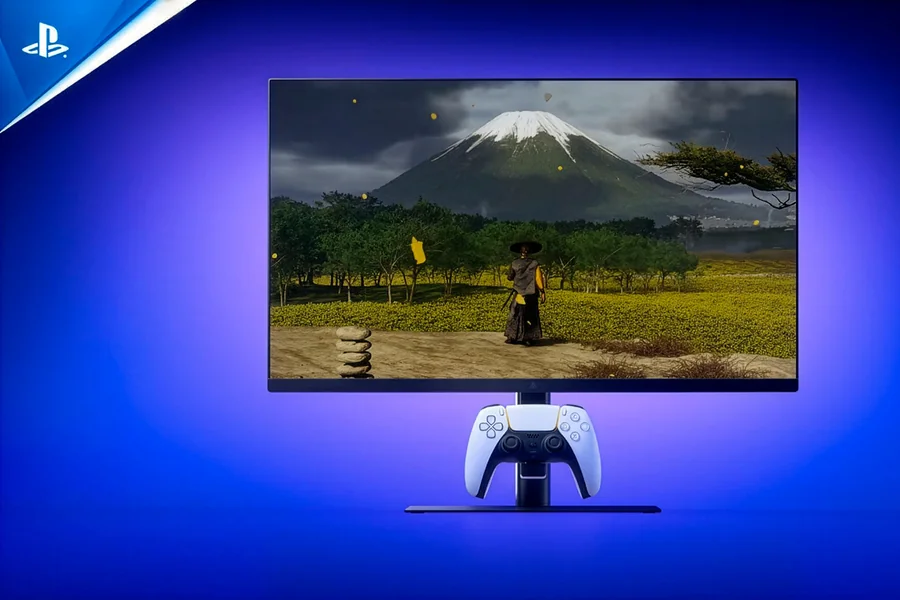
The PS5 has revolutionized the world of console gaming with its high-end hardware, reduced load speeds, ray tracing, and high refresh rates. Although most gamers use a TV to connect their console, more gamers are opting to use a monitor with PS5 enjoying better response and image quality as well as a more preferred gaming environment.
A good gaming monitor for PS5 can significantly enhance the PS5 experience. Regardless of the type of game you play: competitive shooters, sports games and racing simulators, story-driven adventures, the appropriate display will make playing the game easier and the image quality higher. Yet, with the number of monitors on the market, it might seem overwhelming on what to select.
The optimal display is based on its resolution, refresh rate, screen size, connectivity and budget. There are those players who are more focused on playing competitively, whereas other players seek graphics as immersive as possible. Being aware of the characteristics that are of utmost importance can aid in making a smarter shopping choice.
Here, we will discuss the main aspects that must be taken into consideration when choosing a PS5 monitor and will discuss the features that can help make your gameplay even more enjoyable.
Understanding PS5 Display Capabilities
It is necessary to know what the PlayStation 5 is capable of delivering before you go out shopping to purchase a monitor.
The PS5 can play games up to 4K resolution and on compatible games reaches up to 120Hz refresh rate. This implies that a compatible monitor is capable of showing a smooth motion and better response than the old fashioned 60 Hz displays.
Most games on PS5 today provide the user with varying levels of graphics. Others it depends on higher frame rates, whereas others are interested in better ray tracing and better visual quality. With an efficient monitor, gamers can experience all these features without any problem.
High Dynamic Range (HDR) is also supported on the console, enhancing the contrast and color quality. HDR is able to enhance bright scenes and still have details in the darker regions.
Variable Refresh Rate ( VRR ) is another vital feature. The technology also assists in lessening screen tearing and offers a more fluid game when the frame rates change.
Being aware of such capabilities enables gamers to target displays capable of making the most of the hardware of the console.
Resolution and Refresh Rate: Finding the Right Balance
Two of the most essential specifications to consider in the selection of a gaming monitor are resolution and refresh rate.
A 4K monitor is able to deliver great image clarity and detail. Games look more aggressive, textures are even more realistic and the surrounding more lifelike. Of players who like single-player games that are movie-like in their format, 4K resolution is frequently the resolution of choice.
The solution is not all, though. Refresh rate is the number of times in seconds that the screen is refreshed. The increase in the refresh rate means a smoother movement and faster reaction in games.
Assuming both the game and console can support it, a 120Hz monitor can display as many as 120 frames per second. The higher responsiveness is valued by competitive players as it can enable targeting and movement to be less sluggish.
Other gamers opt to use 1440p as a compromise. These monitors offer high-quality images and may have high refresh rates and at a lower cost.
To the majority of PS5 gamers, a gaming monitor with 4K/120Hz or 1440p/120Hz would offer them an excellent gaming experience. The most appropriate alternative would be determined by the priority; either visual quality or competitive performance.
Important Features to Look for in a PS5 Monitor
Other than resolution and refresh rate, there are other features that may influence gambling performance, and overall satisfaction.
HDMI 2.1 is now one of the sought after features in the modern gaming display. This standard of connection will enable monitors to be completely compatible with 4K gaming at 120Hz, even supporting such features as VRR.
Response time is another important consideration. A decrease in response time also decreases motion blur and ghosting causing sharp images when playing a fast game. A great number of gaming monitors have response times that are competitive in gaming.
Image quality is also a factor of panel technology. IPS panels are characterised by high quality color and viewing. VA panels tend to offer a higher contrast ratio, whereas the TN panels may be faster, but at the expense of the image quality.
Improvement of visual immersion can be greatly achieved with HDR capability. Even though the HDR performance of different monitors can differ, those that have high capability of brightness and color reproduction are likely to provide a better experience.
The adaptive sync technologies can also be used to improve the game play at minimum screen tearing and stuttering. These characteristics aid in the smoother images, especially in intensive games.
Inbuilt speakers, USB, adjustable stands and ergonomics can also be considered as buying factors based on the preference of an individual.
Choosing the Right Screen Size for Your Setup
The size of the screen is neglected, but it can make significant changes to comfort and immersion.
The 27-32-inch monitors have a good balance between picture quality and space on the table, and are favored by many gamers. A 27 inch display is said to be a perfect display to play competitive games since one can easily see the whole screen without overturning their head.
The bigger screens can produce more immersion especially in games that are story-driven, open world, and racing games. A 32-inch display offers more visual effect but at the same time offers desirable image clarity when combined with a 4K resolution.
Smaller monitors can also be used in smaller installations or by individuals with smaller desks. But very small screens might not be able to demonstrate the full potential of PS5 games visually.
The distance should also be a factor in your decision. You may find the proximity to a big screen overwhelming, or you may find it immersive to sit too far away when using a smaller screen.
Adequate balance between the size of the screen, the desktop space, and the distance of viewing can go a long way in enhancing comfort in gaming especially in the long sessions.
Monitor vs TV for PS5 Gaming
The question that many gamers ask is which monitor they should use or a television with the PlayStation 5.
The monitors tend to have fewer input lag and response time. These features render them especially appealing to competitive gaming. Multiplayer shooters, fighting games or esports title players tend to choose monitors due to this reason.
Monitors are also suitable in desktop gaming. They enable the gamers to sit nearer to the screen and this establishes a more focused and immersive experience.
Televisions, though, have benefits of their own. The screens that are larger can offer cinematic experience that many monitors cannot offer. Other modern gaming TV features are HDMI 2.1, VRR, and high refresh rate.
It is up to you to play where and how you like. A monitor can be the more suitable choice, should your setup be based on a desk and a gaming chair. A television may be more appropriate in case you want to play on a couch in a living room setting.
Their responsiveness and performance-oriented design are some of the reasons that many devoted gamers prefer monitors.
Read More: Best Video Editing Software Mac: Top Choices for Creators in 2026
Common Mistakes to Avoid When Buying a PS5 Monitor
The latter mistake is related to the percentage of resolution and the lack of attention to refresh rate and connectivity as one of the most widespread. A fantastic 4K display can be of a lower quality when it does not support higher refresh rates.
The other error is buying a monitor without HDMI specifications. There are displays that can also be used at high refresh rates and only with DisplayPort, which are not used by PS5.
Gamers must also not pay any extra money because of features that they do not require. Color accuracy on professional level, e.g., might not be critical to players who mainly use the monitor to play games.
Lack of consideration of ergonomics may also result in discomfort. A proper positioning of the screen and adjustable stands can enhance posture and alleviate stress when playing long games.
Lastly, there are customers who only concentrate on specifications but pay no attention to actual performance. Reviews and user experiences may give some great insight into the performance of a monitor during real-life gaming.
Research is a cautious task that will enable you to make sure that your investment will bring about the experience that you desire.
Final Thought
The selection of a monitor to use in PS5 can greatly improve your gaming experience. The most optimal configuration is one that has good image quality, good performance, and is one that matches your playing style.
Gamers who place importance on the visual fidelity might like a 4K monitor with HDR capability whereas competitive gamers are usually interested in high refresh rates and low response times. Additional features that include HDMI 2.1, VRR, and quality panel technology also can enhance the overall performance.
No one monitor suits all players. The optimal option will be determined based on your budget, space availability, and the type of games that you want. With the knowledge of the most important specifications and the pitfalls to avoid, you will be able to choose a monitor that would help you reach the maximum out of your PlayStation 5.
Be it fighting on the internet, racing in elaborate worlds or even getting a cinematic adventure, the ideal display would enhance every gaming moment and make it enjoyable and more immersing.
FAQs
What is the best resolution for a PS5 monitor?
4K is generally considered the best resolution because it allows gamers to enjoy the console’s highest visual quality. However, 1440p is also an excellent option.
Does the PS5 support 120Hz monitors?
Yes. The PS5 supports up to 120Hz in compatible games when connected to a monitor that supports high refresh rates.
Do I need HDMI 2.1 for PS5 gaming?
HDMI 2.1 is recommended if you want to fully utilize 4K gaming at 120Hz and access advanced features such as VRR.
Is a 27-inch monitor good for PS5?
Yes. A 27-inch monitor is one of the most popular choices because it balances immersion, image sharpness, and desk space requirements.
Can I use a 1440p monitor with a PS5?
Yes. The PS5 supports 1440p output, making it a great option for gamers who want strong image quality and high refresh rates.
Is a monitor better than a TV for PS5?
For competitive gaming, many players prefer monitors because of their lower input lag and faster response times. TVs may be better for larger-screen, couch-based gaming experiences.